Like us on facebook to get more free pro tricks daily...!

Liked us?

Wednesday, 25 July 2012

How To Get Free Recharge via Sending Free SMS

5 comments
You pay money to recharge your mobile, then don't waste your money to do recharge. Simply click below button and get free recharge via sending free SMS. No one pays you for SMS sent, but here is the new GIANT that pays for every SMS sent.


Ya its true when you Register with ULTOO and thats very Interesting when you EARN Free Recharges. Yes Friends the way is clear now. Just Register using the Below link and Start SMSing for free and earn 2p/sms and it means you are paid for free.

Register NOW and START Earning Free Recharges..................


Note: You have to enter below Referrer Code? (if asked)
If you not enter below Referrer code in referrer box then you are not eligible to get 2rs. instantly for Registration.

Referrer Code : 77947E

After Clicking on the above button Just Register on the SITE and verify your email & Mobile
You get 2rs for Registration (you must have to enter above Referrer code?(if asked) to get 2Rs.) & 1rs for Email Verification
So 3rs is an Instant Bonus !
And For Every Friend you Refer get 1rs Bonus !
Enjoy !
Read more >>

Tuesday, 26 June 2012

How to Make a Conference Call using Android phones

4 comments
I had already post article on How to Make a Conference Call with iPhone.
Now here is another article on How to Make a Conference Call using Android phones.

Follow below steps to make conference calls :

  • 1. Call the first person.
  • 2. Once the call is established, press the Menu button.
  • 3. Tap Add call.
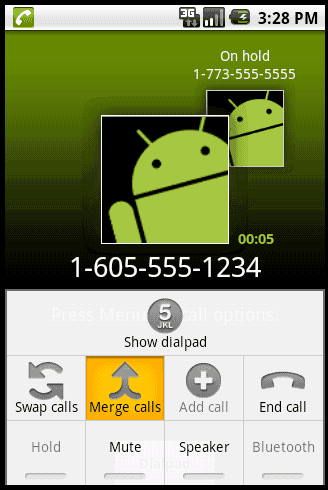
Nexus One - Add call option


  • 4. The dialpad appears. Establish a call with the second person.
  • 5. Once the call is established, press Menu.
  • 6. Select Merge calls.
Nexus One - merge calls option


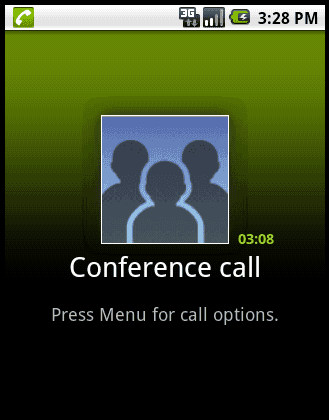
  • 7. Both parties should be on the line now. The Conference call screen will appear.
Nexus One in conference call


  • Repeat steps 2 through 7 to add more people to the call.
That's it....
Don't forget to comment below......
Read more >>

How to Make a Conference Call with iPhone

0 comments


How to Make a Conference Call with iPhone ? What is Conference call ? Conference call will help you to make calls upto 5 friends at same time each of them are speaking and hearing at same time There are more articles about Conference call but i am not discussing it here right now, Here i give you solution about How to Make a Conference Call with Your iPhone. In todays world many businessman people preferred conference calls to attend meetings through phone calls / Conference calls / Video Conference calls. Your iphone also have feature to make conference calls, here is simple tutorial to make conference calls using IPHONE.

Follow below steps to make conference calls :

  • Step 1 : Call one of the people with whom you want to make the conference call.

  • Step 2 : You can manually input the phone number or find the person in your list of contacts.


  • Step 3 : Place that call on hold. 


How you place a call on hold depends on the phone you're using. If you're on an iPhone 4, touch and hold the Mute button. On older devices, just tap Hold.


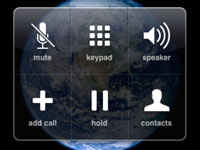
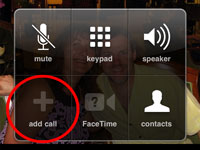
  • Step 4 : Tap Add Call.

  • Step 5 : The keypad will re-apper so you can enter another phone number.


  • Step 6 : Call the next person on the list. 


  • Step 7 : You can enter the number manually or choose from your Contacts list.


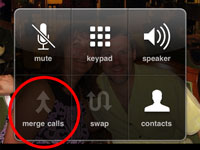
  • Step 8 : Tap Merge Calls so the people you have on the line can chitchat.

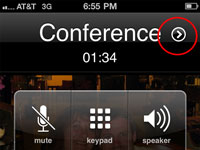
  • Step 9 : At first, the phone number of each caller will scroll at the top of your screen like a rolling ticker. A few seconds later, the ticker is replaced by the word Conference with a circled right-pointing arrow to its immediate right.

  • Step 10 : Repeat Steps 2 to 5 for each additional person whom you want in on the conference call. 


  • Step 11 : You can merge up to five calls at a time.


  • Step 12 : If you want to drop a call from a conference, tap Conference, tap the red circle, and tap End Call.

  • Step 13 : The red circle has a little picture of the phone in it and appears next to the call. 


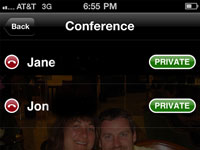
  • Step 14 : To speak privately with one of the callers in a conference, tap Conference, and then tap Private next to the caller you want to go hush-hush with.

  • Step 15 : Tap Merge Calls to bring the caller back into the conference so that everyone can hear him or her.

That's all your done..... Enjoy Call Conferencing...

Read more >>

Sunday, 24 June 2012

7Terabyte's Official Android App

0 comments
Today I feel very glad to announce that 7terabyte.blogspot.com has launched Official Android App. Which is nothing just android app, its more than that it will help you to browse our website without using any browser. It helps our user to access our website at lighting speed. You can share this Android App with your friend using built-in sharing widget. There are several options are included to share our app, some of them are listed below :

  • Bluetooth Sharing
  • Gmail Sharing
  • Via Messaging
  • Share Via Barcode
Google's Android OS now become the No.1 Mobile and Tablet OS in the world, the publicity of Android app goes at lightening speed. The top competitor Apples 70% Top apps are already available in Android market. The android developers are increased day by day and started courses about Android app development.
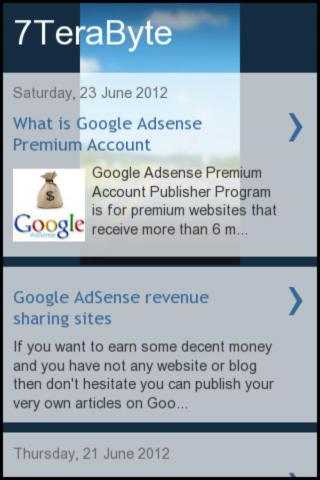
For that reason we develop our Official App which fulfill your day by day requirements. Here are some Screenshots of 7Terabyte's Official App.

Screenshot 1 :


Screenshot 2 : 


So are you ready to download.? If you are PC users right click on below download image and click on Download File with IDM. Because, PC browsers doesn't support .apk extension. And if you are android user then directly click below image to download app.


 So download and enjoy our newly created 7Terabyte app.

 plz add your review about 7Terabyte app in comment box...

Note : Our app is 100% spyware, malware and virus FREE. But I Highly recommended that check file for viruses before download.
Read more >>

Saturday, 23 June 2012

What is Google Adsense Premium Account

2 comments
Google Adsense Premium Account Publisher Program is for premium websites that receive more than 6 million search queries or 10 million page views per month. But in the reality Google might approve websites with much less page view stats which meet Google requirements or policies.

If you not have google adsense account then you can get one that by clicking here Google AdSense revenue sharing sites


How to Get Invitation for Google Adsense Premium Account?

Normally, you can’t apply for Google Adsense Premium Account. This privilege is reserved for those who Google find attractive and worth as a partner. Here are the main factors that Google looks for when inviting new Google Adsense Premium Account.
  • Search Queries/Page views

Google looks for Search queries and Page views of a websites that have a huge amount of traffic. Overall you need to have a millions of monthly page views to get invited.
  • Adsense/AdWords

If you spend a lot of money on Google AdWord program or earn lot of through Google Adsense then there is more chance to get invited by Google for Google Adsense Premium Account.
  • Website Quality

As we know that quality always matters so website contains quality content and followed by Google terms of services can get invited for Google Adsense Premium Account.
Benefits of Google Adsense Premium Account.
  • Creating direct links to Adsense for search results

Google Adsense TOS do not allow publishers to pre-populate Adsense for search box with keywords or create directs links to Adsense for search page.
  • Adsense for Adult Pages/Casino Gambling

Adsense Publishers are not allowed to display Google Ads on that pages contain adult, pornography, mature, casino or gambling content but Google Adsense Premium Account holder are not limited they can use ads on such pages.
  • Advanced Adsense Ads Customization

Google Adsense Premium Account is not limited by the ad formats provided by Google Adsense. They are free to customize the font, sizes and color schemes of their ad units.
  • Customized Revenue Terms


Normal Google Adsense Publishers have fixed revenue percentage and it’s same for all regular Adsense Publishers. But Google Adsense Premium Account can negotiate the share percentage with Google.
  • Optional Google Adsense Ad labeling

Google Adsense Premium Account has the prerogative to remove the “Ads by Google” or “AdChoices”. They are also not required to mark the units as Ads, as opposed to Adsense’s common policy of marking the units are “Sponsored Links” or “Advertisements”. It helps to increase the click through rate (CTR).
  • Dedicated Account Manager

Google Adsense Premium Account is also assigned a dedicated Google representative who helps optimize the look and feel of their Google Ads for better performance.

So keep posting quality articles on your blog or website to get moer traffic and to receive Google Adsense Premium Account invitation.
Read more >>

Google AdSense revenue sharing sites

7 comments
If you want to earn some decent money and you have not any website or blog then don't hesitate you can publish your very own articles on Google AdSense revenue sharing sites to earn money from google adsense. And suppose you have website but not approved by google adsense then don't get tense you can get approved by Google AdSense revenue sharing sites.

List of Google AdSense revenue sharing sites


Here are some of the List of Google AdSense revenue sharing sites :

  • Passiveknowledge: Passive Knowledge is adsense revenue sharing sites that share 75% of the adsense income.
  • Hubpages: HubPages is your online space to share your advice, reviews, useful tips, opinions and insights with hundreds of other authors. HubPages is completely free
  • Xomba: Xomba is a writing community where you can post your own original content, network with other writers and get paid to write.
  • Senserely: Senserely is an Adsense Revenue Sharing Community, our members are all AdSense Publishers and write in their blogs original content so that everybody profit
  • Squidoo: The popular (free) site for creating single webpages on your interests and recommendations. Even earn money for charity or yourself.
  • Shoutmeloud: ShoutMeLoud offer adsense revenue sharing for Guest bloggers.
  • Expertscolumn: Expertscolumn is a community where authors get paid to write columns (articles). Authors that we usually refer to as columnists simply
  • Devilsworkshop: Devils’ Workshop is a blog about internet, technology, blogging, SEO, wordpress, social networking news, tips & tutorial.
  • Simpy: Simpy brings you the latest news from around the world, covering breaking news in business, politics, entertainment, technology, and more.
If you like this post then plz add comment below, then i will post sites that shares 100% adsense revenue.
Read more >>
 

Total Pageviews

Translate

7TeraByte © 2012. All Rights Reserved | DMCA Protected | Back To Top